mirror of
https://github.com/lildude/ha-addon-teslamate.git
synced 2026-10-13 21:19:16 -04:00

47 lines
1.4 KiB
Markdown
47 lines
1.4 KiB
Markdown
# TeslaMate Addon for Home Assistant
|
|
|
|
This addon builds on the excellent work of [Adrian Kumpf](https://github.com/adriankumpf/teslamate). See his repo for information regarding the TeslaMate application.
|
|
|
|
## DB Connection
|
|
|
|
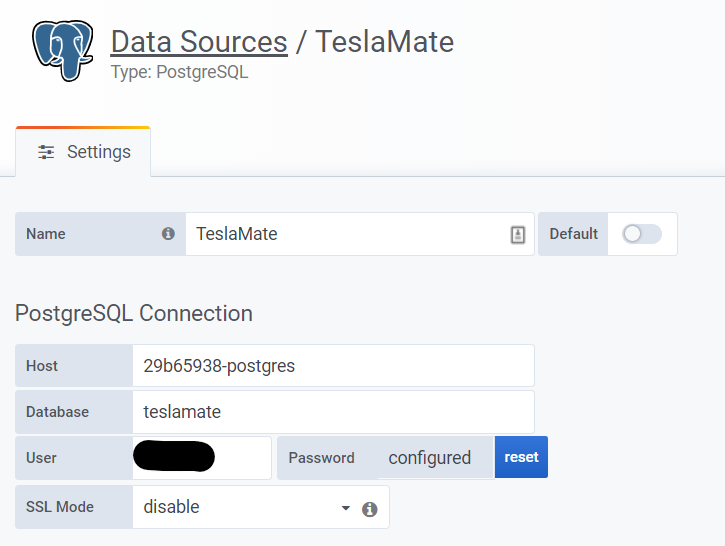
If using the Postgres addon from this repo, the database host is `29b65938-postgres`
|
|
|
|
## MQTT Configuration
|
|
|
|
You **must** have a username and password defined for your MQTT user, do not use the HA local login (thanks [quach128](https://github.com/quach128))
|
|
|
|
## Grafana Configuration
|
|
|
|
I recommend you use the existing Grafana addon from the community addons
|
|
|
|
**NEW - Automatic dashboard uploading!**
|
|
|
|
### Data Source
|
|
|
|
Configure a PostgreSQL data source as follows:
|
|
|
|
|
|
|
|
### Uploading Dashboards
|
|
|
|
Configure the **Grafana** addon and set the admin username and password:
|
|
|
|
```yml
|
|
env_vars:
|
|
- name: GF_SECURITY_ADMIN_USER
|
|
value: admin
|
|
- name: GF_SECURITY_ADMIN_PASSWORD
|
|
value: mysecretpassword
|
|
```
|
|
|
|
Now configure the **Teslamate** addon:
|
|
|
|
```yaml
|
|
grafana_import_dashboards: true
|
|
grafana_folder_name: "TeslaMate"
|
|
grafana_host: "a0d7b954-grafana" # this is correct if you use the community addon
|
|
grafana_port: 3000 # this is correct if you use the community addon
|
|
grafana_user: "admin"
|
|
grafana_pass: "pass"
|
|
```
|